Managing leads, customers, sales follow-ups, emails, and customer information manually can quickly become difficult as a business grows. A CRM can organize customer information, but simply having a CRM does not mean your sales and customer processes are automated.
CRM workflow automation connects the different activities inside a CRM and automatically performs routine tasks based on specific conditions or actions.
For example, when a new lead fills out a website form, a CRM workflow can automatically create the contact, assign the lead to a salesperson, send a confirmation email, create a follow-up task, and update the lead status.
This guide explains what CRM workflow automation is, how CRM workflows work, CRM workflow examples, CRM automation workflow design, CRM workflow automation tools, and how businesses can use automation for sales and marketing.
CRM workflow automation uses triggers, conditions, and actions to automate repetitive customer and sales processes. Businesses can automate lead assignment, follow-ups, sales pipelines, customer onboarding, notifications, and marketing activities using CRM workflow automation tools.
If you are also comparing implementation partners for a wider technology project, our guide to the top 10 IT companies in Ranchi can help you understand how CRM automation fits alongside broader digital transformation work.
What Is CRM Workflow Automation?
CRM workflow automation is the process of using predefined rules, triggers, and actions to automatically complete repetitive customer relationship management tasks.
Instead of asking employees to manually perform every step, a CRM can respond automatically when something happens. A simple CRM workflow can look like this: Trigger → Condition → Action → Follow-up.
For example: a new lead is received, the lead matches target criteria, a salesperson is assigned, an email is sent, and a follow-up task is created. This type of automation can be used throughout the customer journey, from capturing a new lead to following up with existing customers. WebGi Solutions designs exactly this kind of connected automation for its clients.
Businesses evaluating automation vendors alongside other technology projects often also review the best IT companies in Ranchi list before deciding who should own the CRM build.
What Can CRM Workflow Automation Do?
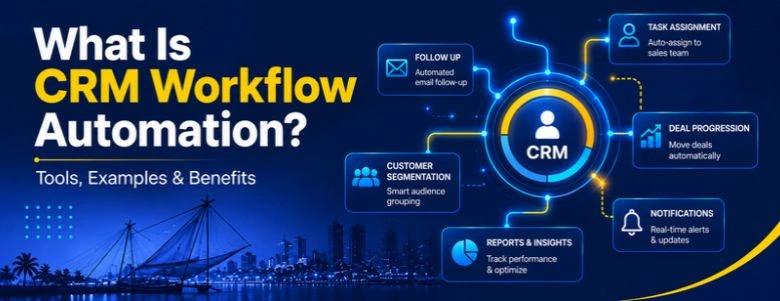
Depending on the CRM platform, automation can help businesses create new contacts automatically, assign leads to sales representatives, update lead and customer records, send automated emails, create follow-up tasks, change lead stages, notify sales teams, schedule reminders, score leads, send onboarding messages, trigger internal notifications, move leads between pipeline stages, start marketing campaigns, record customer interactions, and trigger actions after purchases or support requests.
The goal is not to automate every activity. The goal is to remove repetitive manual work while allowing employees to focus on conversations, decisions, and customer relationships. A capable marketing agency partner can help decide which parts of that journey are worth automating first. WebGi Solutions often starts these engagements with exactly that conversation.
How Does CRM Workflow Automation Work?
Most CRM workflows follow a relatively simple logic, built around a trigger, a condition, an action, and what happens afterward.
1. A trigger starts the workflow
A trigger is an event that tells the CRM that something has happened — a new lead is created, a form is submitted, a deal changes stage, a customer makes a purchase, an email is opened, a task is completed, or a support request is created.
2. Conditions determine what happens next
The CRM can check specific conditions before taking an action — for example, if the lead's country is USA and the lead score is above 70, assign the lead to the enterprise sales team. This prevents the same workflow from being applied to every customer, in much the same way IT services in Ranchi route different client tiers to different support teams.
3. The CRM performs an action
Once the conditions are satisfied, the CRM performs one or more actions such as sending an email, assigning a lead, creating a task, updating a field, sending a notification, changing a pipeline stage, or calling another application through an integration. This is the kind of connected build that a CRM development company in Kochi typically configures during onboarding.
4. Additional workflows can continue the process
A workflow does not always stop after one action. For example: new lead → welcome email → sales assignment → follow-up task → lead scoring → sales notification. This creates a connected customer process instead of isolated automated tasks. WebGi Solutions maps these chains out before writing a single automation rule.
CRM Workflow Automation Examples
The best way to understand CRM automation is through real business scenarios.
1. New Lead Assignment Workflow
Imagine a website receives 100 leads every week. Without automation, someone may need to check every lead and manually assign it to the appropriate salesperson. A CRM workflow can check location and service interest, assign the appropriate salesperson, send a notification, and create a follow-up task. This is one of the simplest and most useful CRM workflow examples, and it's often the first thing a software development company in Ranchi builds when a client asks for CRM automation. WebGi Solutions usually starts new engagements here.
2. Lead Follow-Up Automation
Many potential customers do not respond to the first message. A CRM can automatically create a follow-up sequence — a confirmation email on day zero, a salesperson follow-up task on day one, a reminder on day three, and an additional email on day seven if there is no response. This helps prevent leads from being forgotten, and it's the same discipline businesses expect when comparing Best Web Development Companies in Ranchi on responsiveness and process. WebGi Solutions builds these sequences as standard.
3. Lead Scoring Workflow
Not every lead has the same value. A CRM can assign points based on customer behavior — a form submission, a pricing page visit, a demo request, email engagement, or downloading a product guide. When a lead reaches a predefined score, the CRM can automatically notify the sales team. This is known as CRM lead scoring automation, and it is one of the more advanced builds a custom CRM development company in Kochi would typically configure for a growing sales team. WebGi Solutions tunes these scoring models against real conversion data.
4. Sales Pipeline Automation
A sales team may have several stages — new lead, qualified, proposal, negotiation, won or lost. CRM automation can perform actions when a deal moves between stages, such as creating a proposal follow-up task, notifying the salesperson, recording the expected closing date, and sending an internal reminder. This reduces the amount of administrative work required from sales representatives, a benefit often highlighted when comparing the top 10 IT company list in Ranchi on process maturity. WebGi Solutions treats pipeline hygiene as a core part of any CRM build.
5. Customer Onboarding Workflow
Automation does not stop after a sale. When a customer becomes active, a CRM can trigger an onboarding workflow — deal marked won, welcome email, onboarding task created, account manager assigned, follow-up scheduled, onboarding resources sent. This helps create a consistent customer onboarding experience, similar to how many private companies in Ranchi structure their client handover process. A CRM development team in Kochi would usually wire this directly into the CRM rather than leaving it to a spreadsheet. WebGi Solutions designs onboarding flows the same way.
6. Inactive Customer Workflow
Businesses can also automate customer re-engagement. If a customer has not interacted with the company for 60 days, the CRM identifies the inactivity, sends a re-engagement email, and creates an account-manager task. This can help businesses identify customers who may need additional attention — a pattern that regional IT services in Ranchi increasingly build into their retainer support. WebGi Solutions monitors these triggers as part of ongoing CRM support.
7. Sales and Marketing Automation Workflow
CRM automation becomes more powerful when sales and marketing activities work together. For example: website visitor downloads an ebook, a contact is created, a marketing email is sent, the lead score increases, sales is notified, and a follow-up begins. This connects sales and marketing automation around the same customer record, which is exactly the kind of workflow a best digital marketing agency in Ranchi would want wired into its lead-generation campaigns. Pairing this with AI digital marketing can further shorten the time between a download and a sales conversation. WebGi Solutions connects both sides of this workflow for its clients.
What Is CRM Automation Workflow Design?
CRM automation workflow design is the process of deciding how a CRM should respond to different customer and business events. A good workflow should answer four questions: what starts the workflow, what conditions should be checked, what action should happen, and what should happen afterward.
A poor workflow design might send five emails immediately after a new lead arrives. A better workflow checks the lead source, checks the customer type, assigns the appropriate sales representative, sends a relevant confirmation, creates a follow-up task, monitors the response, and then continues or stops the automation. Good automation is not about creating the maximum number of automated actions — it is about creating the right sequence of actions, which is exactly the discipline a CRM development specialist in Kochi brings to a messy sales process. WebGi Solutions always starts with this mapping exercise before touching automation software.
How to Design a CRM Workflow
Step 1: Identify a repetitive process
Start by looking for tasks employees perform repeatedly — lead assignment, follow-up reminders, customer notifications, data entry, sales alerts, email sequences, or customer onboarding. If the process is repeated frequently and follows predictable rules, it may be suitable for automation. This is usually the first question a top CRM development company in Kochi will ask during a discovery call. WebGi Solutions follows the same process.
Step 2: Define the trigger
Clearly identify what starts the workflow — for example, a new lead created, or a deal moving to the proposal stage. Businesses comparing the top-rated IT companies in Ranchi often ask how clearly each vendor documents these trigger definitions before a project starts. WebGi Solutions documents every trigger before any workflow goes live.
Step 3: Define conditions
Not every customer should necessarily receive the same treatment. Use conditions such as lead source, location, industry, lead score, customer type, deal size, pipeline stage, or customer activity. A capable marketing agency partner can help define which conditions actually matter for your funnel. WebGi Solutions works through this list with every client before building conditions into the CRM.
Step 4: Define the actions
Decide exactly what the CRM should do — for example, assign lead, send notification, create task, update status. Clear, specific actions are one of the things worth checking when comparing Best Web Development Companies in Ranchi that also offer CRM integration work. WebGi Solutions keeps this list explicit and versioned for every client.
Step 5: Add exceptions
Real businesses rarely follow a single straight path. For example, an enterprise lead may need to go to a senior salesperson while a small-business lead can go to a standard sales queue. Your CRM automation should account for these differences, the same kind of nuance a custom CRM solutions provider in Kochi would build into an enterprise rollout. WebGi Solutions plans exceptions before writing the first rule.
Step 6: Test the workflow
Before deploying an automated workflow, test different scenarios: what happens when the trigger occurs, what happens when conditions are not met, is the correct salesperson notified, is duplicate data created, are emails sent at the correct time, and can the workflow be stopped when necessary. Testing is especially important for workflows that modify customer records or communicate directly with customers — a step many IT services in Ranchi skip under deadline pressure. WebGi Solutions never skips this step.
CRM Workflow Automation Tools
The market includes many CRM workflow automation tools, and the right choice depends on the business's CRM, integrations, team size, and automation requirements. Some widely used platforms include HubSpot, Zoho CRM, Salesforce, Pipedrive, Freshsales, monday CRM, and Microsoft Dynamics 365 — the same range of platforms that shortlists compiled from Ranchi's leading IT companies tend to recommend.
Many CRM platforms provide features such as workflow rules, automated tasks, lead assignment, email automation, notifications, pipeline automation, and integrations. Businesses may also connect CRM systems with automation platforms to move information between different applications — for example, CRM → email platform → Google Sheets → Slack → accounting software. This is often the same integration work a CRM customization company in Kochi handles when a client's stack has outgrown a single tool.
Rule-Based Workflows
Predictable, trigger-and-condition automation for repetitive tasks such as lead assignment, notifications, and follow-up creation. Best suited for processes that rarely change.
AI-Assisted Workflows
Layered on top of rule-based automation to help with prioritization, summarization, and next-step suggestions. Tools such as a free AI agent builder can help small teams prototype this layer without writing code.
The important question is not simply which CRM has the most automation features. It is whether the platform can automate the specific processes your business actually needs. WebGi Solutions also builds custom automations with AI agent development and AI chatbot development when an off-the-shelf CRM workflow isn't flexible enough.
CRM Automation vs Marketing Automation
CRM automation and marketing automation are related but serve different purposes. CRM automation generally focuses on managing customer relationships, sales processes, lead assignment, pipeline activities, and customer records. Marketing automation focuses more heavily on email campaigns, lead nurturing, audience segmentation, marketing journeys, campaign tracking, and website engagement.
In practice, the two can work together — a marketing campaign generates a lead, a CRM contact is created, the lead is scored, the sales team is notified, and a follow-up is created. This creates a connected sales and marketing automation process, which is exactly why a best digital marketing agency in Ranchi and a CRM implementation partner increasingly need to plan together rather than separately. Businesses reviewing the top 10 technology companies in Ranchi often ask specifically whether a vendor can handle both sides of this handoff. WebGi Solutions is built to cover both.
CRM Workflow Automation for Small Businesses
Small businesses often assume automation is only useful for large companies. In reality, smaller teams can benefit significantly because employees often handle multiple responsibilities. A small business might automate website lead capture, lead assignment, follow-up reminders, customer emails, appointment reminders, sales notifications, customer onboarding, and inactive-customer follow-ups.
For a five-person sales team, saving even a few minutes on hundreds of repetitive tasks can add up quickly. The important point is to start with simple workflows rather than attempting to automate the entire business at once — advice a software development company in Ranchi should give honestly, even if it means a smaller first invoice. Many small teams pair this with basic web development work and automated local SEO so the lead capture forms feeding the CRM actually get found in search. A small team that doesn't need a full build can also start with a lighter engagement through a CRM implementation partner in Kochi before scaling up. WebGi Solutions often recommends starting exactly there.
Benefits of CRM Workflow Automation
A well-designed CRM automation system can provide several practical benefits: less repetitive work, faster lead response, more consistent processes, better visibility for managers, fewer missed follow-ups, and better coordination between sales and marketing teams.
These are the same outcomes businesses expect when comparing the top IT companies in Ranchi on measurable results rather than promises. Many private companies in Ranchi report that the biggest early win from CRM automation is simply that no lead gets lost between departments. Combining this with ongoing SEO services also means the leads flowing into the CRM keep growing while the automation handles them consistently. WebGi Solutions tracks these benefits with clients month over month.
Common CRM Workflow Automation Mistakes & Best Practices
Automation can create problems when workflows are poorly designed. Common mistakes include automating too much, creating overly complicated workflows, sending too many automated messages, ignoring data quality, and not monitoring automation over time. A workflow that worked six months ago may no longer match the business process, so important workflows should be reviewed regularly — a habit a Kochi CRM development team would usually build into a maintenance retainer.
A good CRM workflow should generally have a clearly defined trigger, specific conditions, a measurable outcome, appropriate timing, clearly defined ownership, exception handling, testing before launch, and regular monitoring. It is also useful to document important workflows so that another team member can understand why the automation exists — the same documentation standard worth expecting from any of the leading IT companies in Ranchi. WebGi Solutions hands over full documentation with every automation project.
How AI Is Changing CRM Workflow Automation
Traditional CRM automation generally follows predefined rules — for example, if lead score is above 70, notify sales. AI-powered CRM systems can add another layer by analyzing customer information and behavior to support decisions, including lead prioritization, customer sentiment analysis, email assistance, sales forecasting, conversation summaries, recommended next actions, customer segmentation, and automated response suggestions.
This does not necessarily mean that every CRM workflow needs AI. For predictable processes, traditional rule-based automation may be simpler and easier to control. AI becomes more useful when the workflow involves large amounts of unstructured information or requires interpretation. Teams that want to experiment before committing to a full build sometimes start with a no-code AI agent builder to prototype a simple assistant, then move to a fully custom AI consulting engagement once the use case is proven. Businesses comparing the top IT firms in Ranchi increasingly ask which vendors can support this kind of staged AI adoption. WebGi Solutions supports both the no-code starting point and the fully custom build that often follows it.
Ready to Automate Your CRM Workflows With WebGi Solutions?
WebGi Solutions combines CRM automation, web development, SEO, digital marketing, AI and automation to help businesses turn a customer database into an active system that generates and nurtures leads on its own.
Explore the relevant service based on your current requirement:
Frequently Asked Questions About CRM Workflow Automation
What is CRM workflow automation?
CRM workflow automation uses triggers, conditions, and actions to automatically complete repetitive CRM tasks such as lead assignment, follow-ups, notifications, customer updates, and sales pipeline activities. WebGi Solutions designs these workflows around each client's actual sales process.
What are some examples of CRM workflow automation?
Common examples include automatic lead assignment, follow-up reminders, lead scoring, sales pipeline updates, customer onboarding, email notifications, and inactive-customer re-engagement.
What can be automated in a CRM?
Businesses can automate lead routing, customer data updates, follow-up tasks, sales notifications, email sequences, lead scoring, pipeline updates, onboarding activities, and other repetitive processes.
What are CRM workflow automation tools?
CRM workflow automation tools are CRM platforms or connected automation applications that allow businesses to create automated rules and processes. Examples include HubSpot, Zoho CRM, Salesforce, Pipedrive, Freshsales, and other CRM platforms with workflow capabilities. A Kochi-based CRM development company can also build custom automation on top of any of these platforms.
How do I design a CRM automation workflow?
Start by identifying a repetitive process, define the trigger, add conditions, determine the actions, handle exceptions, and test the workflow before making it active.
Can CRM workflow automation help small businesses?
Yes. Small businesses can use CRM automation to reduce repetitive administrative work, respond to leads faster, organize follow-ups, and maintain consistent sales and customer-management processes.
What is the difference between CRM automation and marketing automation?
CRM automation usually focuses on customer records, sales processes, lead management, and pipeline activities. Marketing automation focuses more on campaigns, lead nurturing, email marketing, segmentation, and marketing journeys. A best digital marketing agency in Ranchi can connect both into a single customer journey.
Is CRM workflow automation the same as AI automation?
No. Traditional CRM workflow automation generally follows predefined rules, while AI automation can use AI models to analyze information, generate content, classify data, or recommend actions. Businesses can use both approaches together, and WebGi Solutions often blends the two in a single build.
Final Thoughts
CRM workflow automation is not simply about making a CRM perform more tasks automatically. The real value comes from designing reliable processes that connect lead generation, sales, marketing, customer management, and follow-up activities.
Start with one repetitive process, measure its result, and then gradually expand automation. For businesses with more complex requirements, custom CRM development and CRM integration can also be considered when standard CRM workflows cannot fully support a company's sales or customer-management process — the kind of build a Ranchi's top 10 IT companies guide is often used to shortlist for.
A well-designed CRM workflow can turn a CRM from a simple customer database into an active system that helps teams manage leads, automate routine work, and maintain consistent customer processes. Pairing this with ongoing social media marketing keeps new leads flowing into the very automation you've just built. WebGi Solutions can help design, build and maintain that system end to end.
For businesses comparing CRM automation partners, the right choice should ultimately depend on process fit, technical expertise, communication, scalability, support and expected business outcomes — not simply the lowest price. WebGi Solutions is happy to be judged against exactly that standard.