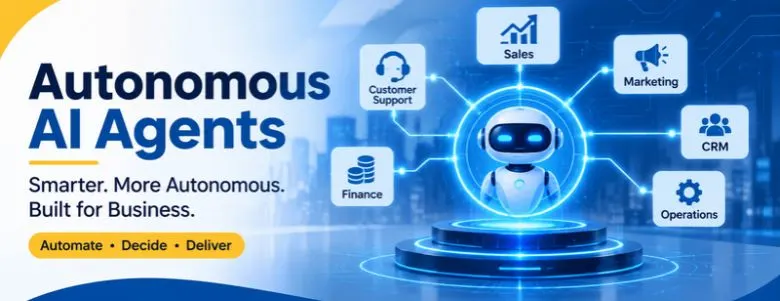
Businesses are moving beyond traditional automation and simple AI-powered chatbots. Today, organizations are exploring systems that can understand objectives, analyze information, make decisions, interact with software and complete multiple tasks with limited human intervention. These systems are known as autonomous AI agents.
Unlike conventional automation tools that follow fixed instructions, autonomous AI agents can evaluate situations, determine the next steps and use connected tools to accomplish specific goals. They can support customer service, sales operations, financial processes, marketing activities and internal business workflows.
For example, a business could use an autonomous AI agent to manage incoming sales enquiries. Instead of simply answering a customer’s question, the agent could identify the customer’s requirements, retrieve relevant product information, qualify the lead, update the CRM and schedule a sales meeting based on predefined permissions.
This creates new opportunities for organizations looking to improve operational efficiency, reduce repetitive work and build more responsive business processes.
In this guide, we explore what autonomous AI agents are, how they work, their architecture, business applications, implementation considerations and how organizations can develop solutions that fit their operational requirements.
Autonomous AI agents are intelligent systems that independently understand goals, make decisions, and execute tasks with minimal human intervention. Discover how they work, their business applications, benefits, challenges, and role in transforming operations. Learn how businesses can implement autonomous AI agents to improve productivity, streamline workflows, and drive growth.
Planning to build an agent around your own systems? WebGi Solutions offers AI agent development services and can also connect agents to your CRM, ERP and internal software. You can read what clients say on our reviews page or learn about the team on our about page.
What Are Autonomous AI Agents?
Autonomous AI agents are software systems powered by artificial intelligence that can independently pursue defined objectives by analyzing information, planning actions and interacting with connected tools or applications.
They use large language models (LLMs), machine learning, natural language processing, APIs and external data sources to understand tasks and decide how to complete them. Traditional software follows predefined instructions, while an autonomous agent can evaluate a situation and select an action based on its objective, available information and operational permissions. Teams that want a purpose-built system usually start with custom AI agent development instead of a generic tool.
Consider an organization receiving hundreds of customer enquiries every day. A traditional chatbot answers frequently asked questions with predefined responses. An autonomous agent can perform a broader sequence:
- Understand the customer's enquiry and identify their requirements.
- Retrieve relevant information from internal databases.
- Check product availability or service eligibility.
- Update the customer relationship management (CRM) system.
- Prepare a personalized response.
- Schedule a follow-up or escalate the enquiry when necessary.
The important distinction is that an autonomous agent does more than generate information. It takes actions through connected systems to complete a business objective. Autonomy does not mean unlimited independence: businesses must define the agent's responsibilities, permissions, approval requirements and boundaries first. That is why WebGi Solutions designs every agent with controlled permissions from day one.
How Do Autonomous AI Agents Work?
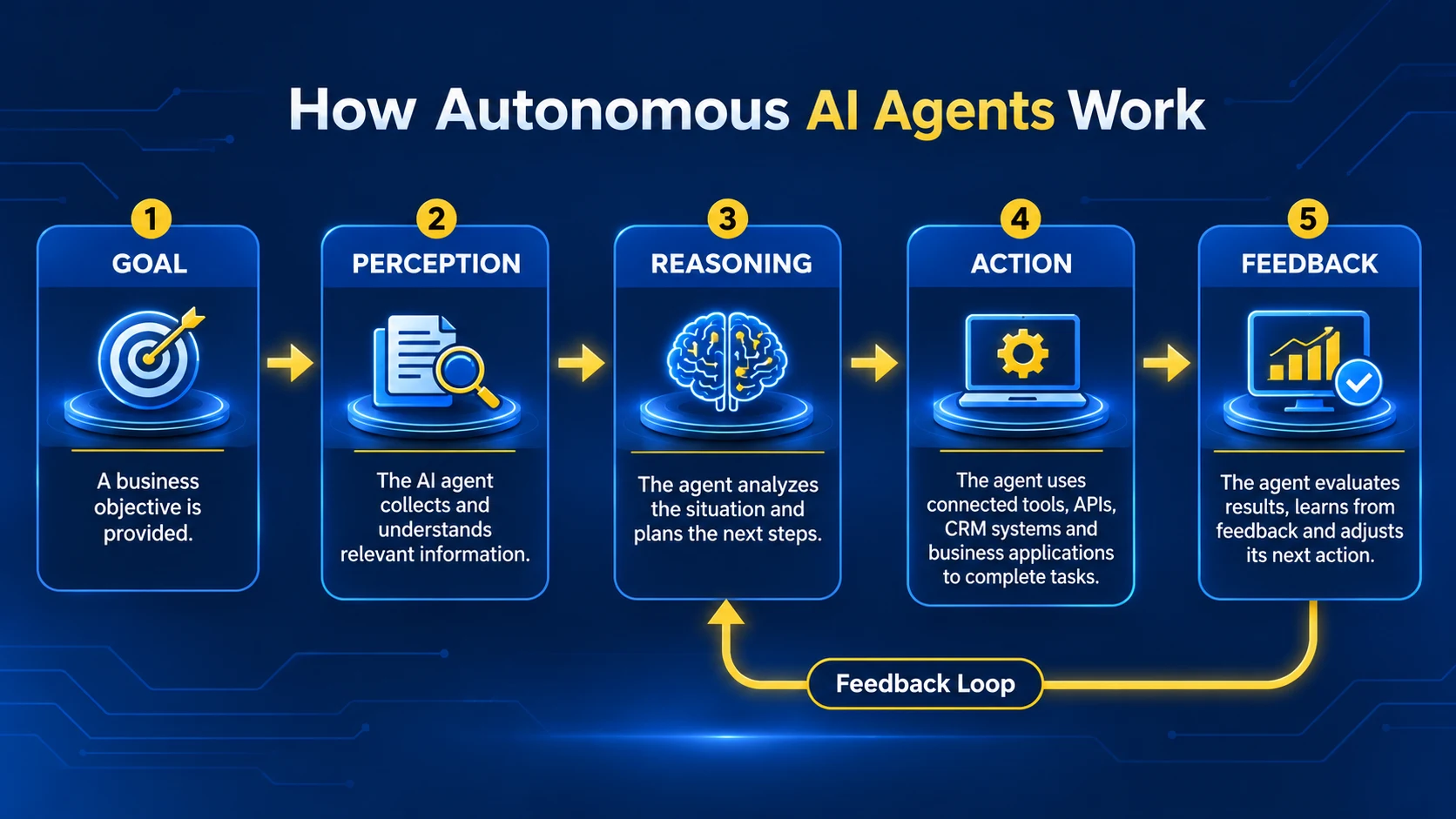
An autonomous AI agent operates through an iterative process of information gathering, reasoning, planning, execution and evaluation. Instead of relying only on a fixed sequence of instructions, it can adjust its approach when new information arrives or when an action does not produce the expected result.
1. Goal Understanding
The process begins when the agent receives an objective from a user, business application or automated trigger, such as: "Identify new enquiries that match our ideal customer profile and schedule follow-up meetings with qualified prospects." The agent interprets the objective and determines which information and actions are required.
2. Information Gathering
The agent retrieves data from authorized sources such as CRM platforms, business databases, ERP software, internal documents, support systems, third-party APIs and knowledge bases. The quality of this information directly influences its decisions, which is why many projects begin with custom CRM development or data clean-up.
3. Reasoning and Planning
The agent evaluates its options and creates a plan. A sales agent, for example, may verify company size, industry, requirements and purchasing timeline before assigning a lead. Complex tasks may need several planning cycles.
4. Action Execution
Using connected tools, the agent updates CRM records, creates support tickets, retrieves documents, sends approved communications or triggers business workflows.
5. Observation and Evaluation
The agent checks the outcome. If an action fails, it may retry within defined limits, choose another permitted approach or request human help.
6. Completion and Reporting
The agent records the outcome, keeps an execution history and audit trail, and flags tasks that need human attention. An agent does not become more intelligent just by performing more tasks: improvement requires feedback, evaluation, updated instructions, better data and sometimes model refinement. The on-demand AI technical services team at WebGi Solutions supports this ongoing tuning.
Key Components of an Autonomous AI Agent
Building an effective agent takes more than connecting an AI model to a chat window. Several components must work together for reliable execution. At WebGi Solutions, we treat each one as a separate design decision.
Large Language Models
Provide reasoning and language processing so the agent can interpret instructions and plan. The model you pick affects quality, speed, language support and cost.
Memory & Context
Short-term memory tracks the current task. Long-term memory stores information across sessions. Both must be managed so outdated data does not influence decisions.
Tools & API Integrations
Let the agent update leads through CRM APIs, fetch invoices from accounting software or book meetings. Strong custom software development makes these connections dependable.
Planning & Reasoning Engine
Breaks a larger objective into smaller tasks, sets the execution order and re-plans when new information appears.
Orchestration Layer
Coordinates tasks, tool calls, execution states and communication between agents, and becomes vital when specialized agents collaborate.
Security & Governance
Role-based permissions, authentication, activity monitoring, approval workflows and execution limits decide what the agent can access and do.
Types of Autonomous AI Agents
Different agent architectures suit different business requirements. The categories below can overlap in practical implementations.
| Agent type | Primary function | Example application |
|---|---|---|
| Reactive agents | Respond to current inputs | Automated support responses |
| Goal-based agents | Work toward defined objectives | Sales lead qualification |
| Utility-based agents | Select actions based on desired outcomes | Resource allocation |
| Model-based agents | Maintain an internal representation of their environment | Inventory monitoring |
| Learning agents | Improve through feedback and learning | Recommendation optimization |
| Multi-agent systems | Coordinate specialized agents | End-to-end business operations |
The right architecture depends on task complexity, available data, required autonomy and the level of human oversight. WebGi Solutions helps businesses compare these options before development starts.
Autonomous AI Agents vs Traditional AI Tools
Autonomous agents, AI assistants, chatbots and traditional automation all improve productivity, but they approach tasks differently.
| Feature | Traditional automation | AI chatbot | AI assistant | Autonomous AI agent |
|---|---|---|---|---|
| Execution | Predefined rules | Responds to queries | Assists users | Pursues defined goals |
| Decision-making | Rule-based | Limited | Context-dependent | Goal-oriented reasoning |
| Multi-step tasks | Fixed workflows | Limited | Often user-directed | Can plan and execute |
| External integrations | Possible | Limited or integrated | Available | Used to perform actions |
| Human involvement | Depends on workflow | Usually interactive | Usually collaborative | Configurable oversight |
| Adaptability | Low | Contextual | Contextual | Can adjust execution plans |
A chatbot is designed to communicate, an AI assistant helps users complete tasks, and an autonomous agent coordinates multiple actions toward an outcome. If you only need customer conversations, an AI chatbot development project may be enough. Not every process needs an agent: deterministic automation is often better for repetitive work that demands exact rules. WebGi Solutions can help you judge which approach fits each process.
Real-World Business Applications of Autonomous AI Agents
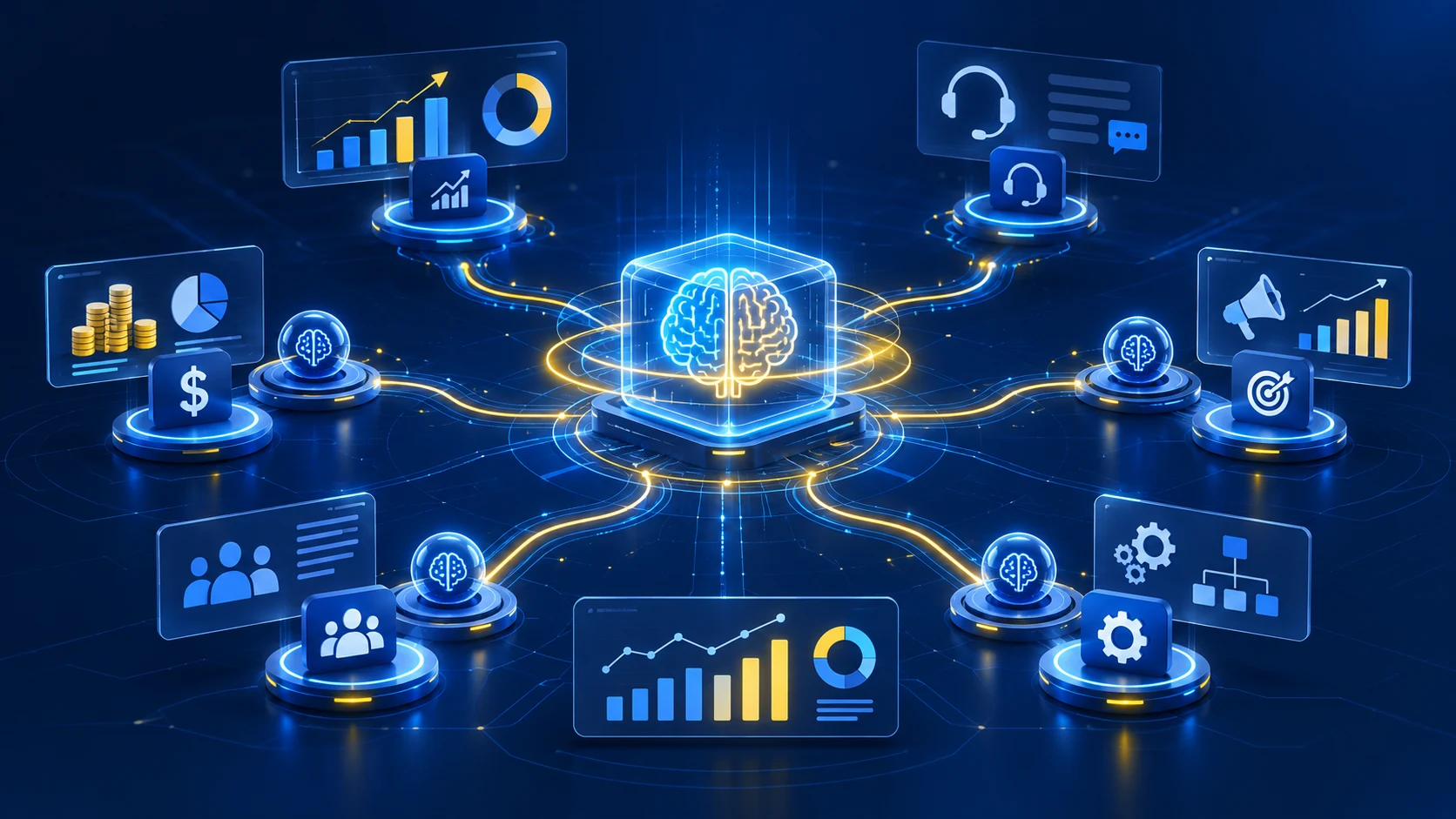
Agents support different departments by connecting information, interpreting requirements and executing approved activities. Here are the areas where WebGi Solutions most often sees demand.
1. Sales and Lead Management
An autonomous sales agent collects incoming lead information, researches company details from approved sources, evaluates prospects against qualification criteria, updates CRM records, drafts follow-ups and schedules meetings. When a prospect submits a website enquiry, the agent can identify the right sales team and start the next approved action. This works best on top of a well-built custom CRM.
2. Customer Service and Support
Agents can check order status, answer account questions, create and update tickets, spot recurring issues and route complex cases. Voice channels can be covered too through AI voice agent call automation. For sensitive complaints or financial disputes, the agent should escalate instead of deciding outside its authority.
3. Finance and Invoice Management
Agents can extract invoice data, match invoices to purchase orders, flag missing documents and unusual transactions, prepare payment reminders and route exceptions for approval. An invoice agent might find a mismatch against a purchase order, prepare an exception report and send it to finance. Connecting accounting and operations data usually involves ERP development services.
4. Marketing and Campaign Management
Agents can analyze campaign performance, spot engagement shifts, organize research, prepare briefs, draft content and recommend optimizations. Human marketers should keep control of brand messaging, budget allocation and major campaign decisions.
5. Healthcare Administration
Agents can help with appointment scheduling, enquiry routing, insurance document collection, record summaries and reminders. Healthcare needs strong privacy, access control and human review, and clinical diagnosis or treatment decisions must never be delegated to an unvalidated general-purpose agent.
6. Human Resources and Recruitment
Agents can organize applications, extract resume details, schedule interviews, answer routine employee questions and prepare onboarding documents. Employment decisions must remain subject to human review and fair assessment practices.
7. E-commerce and Retail
Agents support product discovery, recommendations, order tracking, inventory alerts, return and refund routing and post-purchase communication, always within clearly defined refund, pricing and transaction permissions. Online businesses often pair this with SaaS development for their own platforms.
How Multiple Autonomous AI Agents Work Together
A single agent may be enough for a straightforward task, but complex operations may need several specialized agents. This is a multi-agent system: each agent has a specific responsibility while an orchestration component coordinates the process.
| Agent | Responsibility |
|---|---|
| Lead Research Agent | Collects and organizes prospect information |
| Qualification Agent | Evaluates leads against business criteria |
| Communication Agent | Prepares approved customer communications |
| CRM Agent | Updates customer and sales records |
| Scheduling Agent | Coordinates meetings |
| Reporting Agent | Tracks workflow outcomes |
A typical flow looks like this:
- A new enquiry enters the business CRM.
- The lead research agent collects relevant information.
- The qualification agent evaluates the prospect.
- The communication agent prepares a personalized response.
- The CRM agent updates the lead record.
- The scheduling agent proposes a meeting time.
- The reporting agent records the outcome.
If the prospect gives incomplete information or asks for something outside the permitted workflow, the system pauses and requests human help. A multi-agent design is not automatically better: extra agents add integration points, coordination effort, cost and potential failure points. WebGi Solutions recommends beginning with the simplest architecture that reliably completes the task, and our AI agent development team scales it up only when the process demands it.
How to Implement Autonomous AI Agents in a Business
Successful implementation starts with the right business problem, not with choosing a model or framework.
Step 1: Identify Repetitive, Time-Consuming Processes
Review workflows involving repetitive information gathering, decision support, communication or software interactions. Prioritize processes with measurable outcomes and clear rules. Our team at WebGi Solutions often runs a short discovery workshop for this step.
Step 2: Define the Agent's Objective
Give every agent a specific responsibility. Instead of "manage the sales department," use: "Review incoming website enquiries, qualify prospects using approved criteria and update the CRM with the assessment."
Step 3: Identify Required Data and Software Integrations
Decide which systems the agent needs: CRM, ERP, databases, support platforms, knowledge bases, email, scheduling tools and third-party APIs. Give each integration only the access the agent's role requires. If your systems need rebuilding first, custom software development services can prepare the foundation.
Step 4: Select the Right AI Architecture
Choose between a single agent, a multi-agent system or a conventional automated workflow based on task complexity, response requirements, infrastructure and expected operating cost. WebGi Solutions can review your stack and recommend one.
Step 5: Establish Permissions and Approval Rules
Define what the agent can read, create, update, send, approve or delete. A sales agent may update CRM records and draft emails but need human approval before sending certain messages.
Step 6: Develop and Test the Agent
Test with realistic scenarios: normal execution, missing information, conflicting data, failed API requests, unexpected instructions, unauthorized actions and escalations.
Step 7: Deploy and Monitor Performance
Start with a limited workflow and expand after validating results. Monitor completion rates, accuracy, failures, response times, costs and how often humans must step in.
Step 8: Optimize Through Feedback
Use logs, user feedback and evaluation results to refine instructions, integrations, permissions and workflows. Business needs and software environments change, so monitoring never really ends. Businesses that want help here can use on-demand AI technical services instead of hiring a full in-house team.
How Much Does It Cost to Develop Autonomous AI Agents?
Cost depends on functionality, architecture and business requirements. A simple agent connected to an existing knowledge base needs less effort than a multi-agent system integrated with several enterprise applications.
| Cost factor | What influences the cost |
|---|---|
| AI model | Model selection, usage and token consumption |
| Development | Custom logic, agent architecture and application development |
| Integrations | APIs, CRM, ERP and third-party software |
| Data infrastructure | Databases, document processing and data retrieval |
| Hosting | Cloud infrastructure and runtime requirements |
| Security | Authentication, permissions and monitoring |
| Maintenance | Testing, updates and performance optimization |
Consider ongoing operating expenses, not just development cost. A useful way to estimate value is:
Monthly net benefit = Monthly operational savings + Additional measurable revenue − Total monthly agent operating costs
Use actual business data rather than assumed productivity gains, as we do for every client at WebGi Solutions. For a project-specific estimate, you can contact the WebGi Solutions team with your workflow and systems.
Autonomous AI Agent Security, Privacy and Governance
Agents can access business information and act through connected applications, so a poorly configured agent could reach unnecessary data, take an unintended action or produce inaccurate results. Key safeguards include:
- Role-based access control: an agent that prepares reports should not automatically be allowed to modify financial transactions.
- Human approval checkpoints: require sign-off for high-value payments, financial approvals and important account changes.
- Data privacy: use encryption, access controls, retention policies and secure integrations.
- Activity logging: record instructions, tool calls, decisions, outcomes and approval events.
- Execution limits: cap actions, financial amounts, API calls and run time.
- Error detection and recovery: stop, retry, reverse or escalate failed operations.
- Continuous monitoring: regularly review behavior, permissions, accuracy and performance.
Security belongs in the agent's architecture, not in a patch after launch. WebGi Solutions builds permission rules and audit trails into each AI agent development project from the first sprint.
Autonomous AI Agents vs Multi-Agent Systems
The terms are related but describe different architectures. An autonomous AI agent works independently toward an assigned objective. A multi-agent system has several agents collaborating on a larger one.
A business might deploy one agent for invoice verification. A more complex finance workflow could use several specialized agents to extract invoice data, verify purchase orders, find discrepancies and prepare reports. The choice depends on the number of responsibilities, coordination needs and process complexity. WebGi Solutions can map your workflow and tell you which model is the better fit.
What Is the Future of Autonomous AI Agents?
Agents are expected to become part of everyday business software. Several developments are shaping adoption:
- Greater software interoperability: standardized ways of connecting agents to tools will ease integration with existing infrastructure.
- Multi-agent collaboration: specialized agents will coordinate across departments.
- More controlled autonomy: permissions, approvals and monitoring will be core to enterprise agent design.
- Industry-specific applications: healthcare administration, finance, retail, logistics and professional services will adopt tailored agents.
- Improved agent evaluation: better ways to measure accuracy, reliability, cost and outcomes will emerge.
Wider adoption will still depend on reliable infrastructure, responsible deployment and clear accountability. Many of these agents will also run inside SaaS products, so businesses building software today should plan for AI from the start, and WebGi Solutions can help you do that.
Building Custom Autonomous AI Agent Solutions for Your Business
Every organization has different operations, software and goals. A generic AI tool may not offer the integrations, permissions or workflow flexibility that complex operations need. Custom development lets you build around your existing systems. WebGi Solutions helps businesses with AI-powered software, custom application development and AI integration, and you can learn more about our company or see client reviews before you decide.
The goal is not to automate every activity. It is to find the processes where intelligent systems deliver measurable value while keeping human oversight. Start with one operational challenge and test whether a custom AI solution solves it.
Ready to Build Your Autonomous AI Agent With WebGi Solutions?
WebGi Solutions combines AI agent development, custom software, CRM, ERP and automation to help businesses put intelligent workflows into production. Tell us your use case on our contact page and we will suggest the right starting point.
Explore the relevant service:
Frequently Asked Questions About Autonomous AI Agents
What is an autonomous AI agent?
An autonomous AI agent is an AI-powered software system that can understand a defined objective, plan actions and use connected tools to complete tasks with limited human intervention.
How do autonomous AI agents work?
They collect relevant information, interpret objectives, create plans, execute actions through connected tools and evaluate the results. They may repeat this cycle until the task is complete or human assistance is required.
What is the difference between AI agents and autonomous AI agents?
"AI agents" is a broad category of systems that use AI to perform tasks. Autonomous AI agents have greater independence to plan and execute multiple actions toward a defined objective.
Can autonomous AI agents work without human supervision?
They can perform many predefined tasks independently, but business-critical operations should include monitoring, permissions and human approval checkpoints.
What are the most common applications of autonomous AI agents?
Common uses include customer support, sales qualification, CRM updates, invoice processing, appointment scheduling, marketing analysis and internal workflow coordination. See our AI agent development services for examples.
Can autonomous AI agents integrate with existing CRM and ERP software?
What is a multi-agent AI system?
A multi-agent AI system consists of multiple specialized agents that collaborate and coordinate their activities to accomplish a larger objective.
Are autonomous AI agents suitable for small businesses?
Yes. Small businesses can use focused agents for lead qualification, customer enquiries, appointment scheduling and administrative tasks. The solution should match the budget and operational complexity. On-demand AI technical services from WebGi Solutions are a flexible way to begin.
What are the risks of autonomous AI agents?
Risks include inaccurate outputs, unauthorized access, unexpected actions, data privacy issues, integration failures and operating costs. Testing, permissions, monitoring and human oversight help manage them.
How can businesses develop custom autonomous AI agents?
Identify a suitable use case, define the agent's responsibilities, select the architecture, connect required systems, establish security controls, test the solution and monitor it after deployment. WebGi Solutions can support each step, and you can get in touch here to start.
Final Takeaway
Autonomous AI agents change how businesses interact with software and run operations. By combining AI reasoning, connected tools, business data and controlled execution, organizations can move beyond basic automation toward more adaptive workflows.
The strongest implementations begin with clear business objectives, reliable integrations and appropriate human oversight. Rather than adopting AI simply because it is available, focus on solving real operational problems with measurable results. Whether you need custom software, a SaaS platform, an AI chatbot or a voice agent, WebGi Solutions can take you from the first discovery call to monitored production.
When comparing partners, WebGi Solutions suggests judging them on process fit, technical expertise, communication, scalability and support, not only price. Read our client reviews, then talk to WebGi Solutions about your project.