Why Small Businesses Need AI Automation in 2026
Running a small business often means wearing multiple hats managing customers, responding to leads, handling operations, creating marketing content, and tracking finances.
The biggest challenge is not a lack of tools. It is the amount of time lost on repetitive manual tasks.
AI automation helps small businesses remove operational friction by connecting existing tools, improving customer response times, automating repetitive workflows, and creating scalable systems without increasing workload.
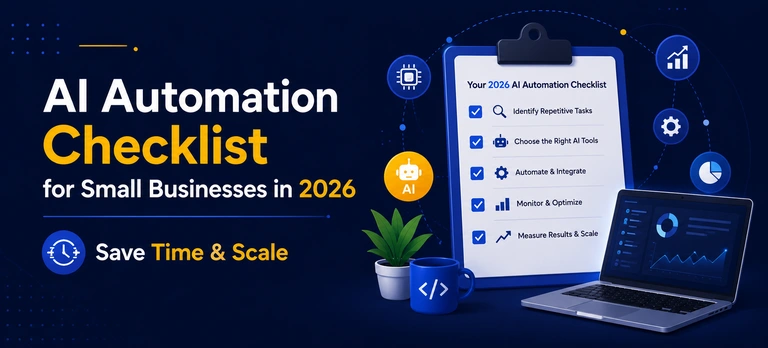
This AI automation checklist explains the key areas where businesses can implement automation in 2026 to improve efficiency and growth.
- Audit your workflow for repetitive tasks that take over 10 minutes and follow the same process — these are your best automation opportunities.
- Connect disconnected business tools using platforms like Zapier and Make to eliminate data silos, reduce errors, and save time.
- Automate lead responses instantly — speed is critical, a delayed reply can send potential customers straight to your competitor.
- Use AI to streamline client onboarding by automating welcome emails, document collection, checklists, and milestone scheduling.
- Always keep human oversight in your automation strategy — review AI outputs, maintain brand voice, and escalate sensitive situations to a real person.
Table of Contents
1. Identify Time-Wasting Tasks With a 3-Day Manual Time Audit
Before investing in AI software, identify where your business is losing time.
I recommend starting with a simple three-day workflow audit. Track tasks that:
- Take more than 10 minutes
- Are repeated frequently
- Follow the same process every time
- Do not require creative decision-making
Common examples include:
- Copying customer information between platforms
- Sending appointment reminders manually
- Creating repetitive reports
- Following up with leads
- Updating spreadsheets
These tasks are the best opportunities for automation because they follow predictable rules.
The goal of AI automation is not to replace your team. It is to remove repetitive work so your employees can focus on higher-value activities like strategy, customer relationships, and business growth.
2. Connect Your Business Tools and Remove Data Silos
One of the biggest problems small businesses face is disconnected software.
Customer details may exist in your CRM, payment information in accounting software, and project updates inside spreadsheets.
When your team manually transfers information between systems, it creates:
- Wasted time
- Duplicate work
- Data errors
- Poor customer experiences
Automation platforms like Zapier and Make allow businesses to connect their existing tools without rebuilding their entire technology stack.
Examples:
Automated Data Updates
When someone fills out a website form, automation can instantly update:
- CRM records
- Email marketing lists
- Customer databases
- Project management systems
Instant Notifications
Businesses can automatically receive alerts when:
- A customer books an appointment
- A payment is completed
- A new lead submits an inquiry
Automated Reporting
Instead of manually collecting data every week, AI-powered dashboards can generate performance summaries automatically.
3. Automate Your Lead Response Within the 5-Minute Window
Speed matters when converting leads.
A potential customer who contacts your business expects a quick response. If they do not hear back, they may choose another competitor.
A strong AI lead automation system can include:
Instant AI Responses
Automatically send a personalized email or SMS immediately after a lead submission.
Example:
Automated Scheduling
Connect booking tools so qualified prospects can immediately schedule calls without waiting.
AI Lead Qualification
AI can analyze incoming inquiries and categorize leads based on:
- Service requirements
- Budget
- Location
- Buying intent
This helps your team prioritize the most valuable opportunities.
4. Create a Faster Client Onboarding Process
A slow onboarding process creates frustration for both businesses and customers.
Many companies waste days collecting:
- Customer information
- Documents
- Project requirements
- Approvals
AI automation can create a smoother onboarding experience.
A complete automated onboarding workflow can:
- Send welcome emails automatically
- Generate client checklists
- Create project folders
- Schedule important milestones
- Collect required documents through forms
This allows businesses to deliver a professional experience from day one.
5. Use AI for Hyper-Local SEO Growth
Local businesses need consistent visibility across search engines and AI platforms.
Customers increasingly search for services using AI assistants and conversational search.
To improve local discoverability, businesses should focus on:
Local Content Creation
Create content around:
- Specific locations
- Customer questions
- Local problems
- Service-based searches
Example:
Instead of targeting only:
Create content around:
Content Repurposing
One detailed article can become:
- Social media posts
- Email newsletters
- FAQ answers
- Short videos
AI tools help transform one piece of content into multiple marketing assets.
Automated Review Collection
Customer reviews influence local search visibility.
Create workflows that automatically request reviews after completing a service.
Example:
24 hours after project completion → send review request email.
6. Build Human Oversight Into Your AI Automation Strategy
Automation should improve customer experience, not remove human judgment.
Businesses should create a human review process for important interactions.
Best practices:
Keep AI Outputs as Drafts
Use AI to create:
- Emails
- Proposals
- Marketing content
- Reports
But review before sending.
Maintain Brand Voice
Ensure AI-generated content matches your company tone, values, and customer expectations.
Create Escalation Rules
Customer conversations involving:
- Complaints
- Complex questions
- Sensitive situations
should automatically move to a human team member.
Conclusion: Start Small and Scale Your AI Automation System
AI automation is not about replacing your business processes overnight.
It is about identifying repetitive tasks, improving workflows, connecting your tools, and creating systems that allow your business to grow efficiently.
- Start with one time-consuming task.
- Automate it.
- Measure the results.
- Then continue improving your systems.
Small improvements in automation can create major productivity gains over time.
Frequently Ask Questions
No. Most AI automation tools are designed to work with existing platforms like CRMs, email tools, accounting software, and scheduling systems.
Businesses can connect their current tools instead of migrating everything.
The best tasks are predictable and repetitive.
A simple rule:
“If something happens repeatedly using the same process, it is likely a good automation opportunity.”
Examples:
- Lead follow-ups
- Data entry
- Appointment reminders
- Reporting
- Customer notifications
Yes, when businesses choose trusted platforms with strong security practices. You can learn more about how Webgi Solutions helps businesses stay secure and grow online.
Always review:
- Data privacy policies
- Security certifications
- Access permissions
- Integration settings
before connecting business information.
Ready to Automate Your Business and Save Hours Every Week?
At WebGi Solutions, we help businesses identify time-wasting tasks, connect their tools, and build smart automation systems that drive efficiency and growth. From AI digital marketing to AI chatbot development, SEO, and AI voice agent & call automation — we deliver customized solutions that remove repetitive work, improve lead response, and help your business scale efficiently.