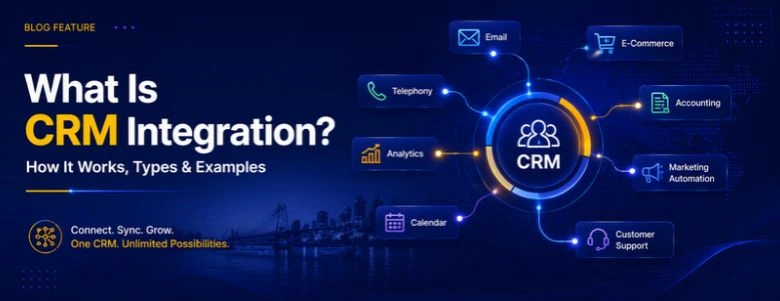
A CRM becomes much more useful when it can communicate with the other software your business already uses.
A website can send new leads directly to the CRM. Marketing platforms can pass campaign and lead data to sales teams. WhatsApp conversations can be connected to customer records. An ERP can share customer and order information with the CRM. Accounting software can receive information when a deal is closed.
This is what CRM integration makes possible.
Instead of moving information manually between different applications, integrated systems can exchange data automatically according to defined rules.
In simple terms:
CRM integration connects your CRM with other business systems so customer data, activities and workflows can move between them without repeated manual data entry.
This guide explains what CRM integration is, how it works, what you can integrate with a CRM, the different integration methods, real-world examples, common challenges, costs and how to choose the right approach.
CRM integration connects your CRM with websites, WhatsApp, email, ERP, accounting, marketing, and other business systems to share customer data automatically. It can use native integrations, APIs, webhooks, iPaaS platforms, or custom development depending on business requirements. This guide explains how CRM integration works, what you can integrate, real-world examples, costs, challenges, security, and best practices.
If you haven't already automated what happens after data lands in your CRM, our CRM workflow automation guide is the natural next step once your systems are connected. Businesses comparing implementation partners can also review the Best Web Development Companies in Ranchi before choosing who builds the integration.
What Is CRM Integration?
CRM integration is the process of connecting a customer relationship management system with other software, applications, websites, communication channels or data sources so they can exchange information.
A CRM might contain leads, contacts, customers, deals, sales activities, customer conversations, notes, tasks and marketing information. But important customer information often exists somewhere else — a company might receive leads through its website, run advertising through Google Ads and Meta, communicate through WhatsApp, manage invoices through accounting software and handle inventory through an ERP.
Without integration, employees may need to copy information from one system to another. With CRM integration, information can move automatically. WebGi Solutions treats this connected flow of customer information as the real deliverable, not just the software licences.
Businesses comparing providers for this kind of work often start from a list such as the top 10 CRM for small business guide before deciding which platform is worth integrating in the first place.
IBM describes CRM integration as connecting a CRM with internal and external applications and data sources to enable automatic data exchange. WebGi Solutions builds toward that same definition, whichever CRM a client has already chosen.
How Does CRM Integration Work?
At a basic level, CRM integration has three parts: source system → integration layer → CRM, or, when information needs to move back, CRM → integration layer → other system. The exact architecture depends on the applications involved and the integration method being used.
For a website-to-CRM example, a visitor submits their name, email, phone number, company and service requested. The CRM can then create a new lead, check whether the contact already exists, assign the lead to a salesperson, record the lead source, create a follow-up task, send a notification and start an appropriate workflow — much like the retainer support IT services in Ranchi increasingly bundle alongside their CRM work.
The important part is that the systems have agreed on what information should move, where it should go and what should happen after it arrives. WebGi Solutions maps this agreement out before any connector is switched on.
Ways to Integrate a CRM
There is no single CRM integration method that works for every business. The most common approaches are native integrations, iPaaS or no-code automation platforms, API integrations, webhooks and custom integrations. WebGi Solutions picks between these based on what the client's existing systems actually support, not on a default preference for custom code.
Native CRM Integrations
A native integration is built into the CRM or provided through its official integration ecosystem — for example, a ready-made connection for an email platform, calendar, accounting application or marketing tool. These are faster to set up and usually supported by the software vendor, but a native integration may not support your exact business process if you need custom fields, custom triggers, complex data mapping or two-way synchronization. This is often where a CRM development company in Kochi gets brought in to extend what the native connector can't do.
iPaaS (Integration Platform as a Service)
Tools such as Zapier, Make and Workato can sit between applications and move information from one system to another — for example, website → Zapier → CRM. This approach is useful when you want to connect several applications without building every connection from scratch, and it's a common starting point recommended by guides to the top 10 CRM platforms for small business.
API Integration
An API integration allows software applications to communicate programmatically — website → CRM API, CRM → ERP API, mobile app → CRM API. This is particularly useful when the business has custom software or requirements that cannot be handled by a standard connector, which is exactly the kind of project a software development company in Ranchi would scope as a development engagement rather than a configuration task.
Webhook Integration
A webhook allows one system to notify another system when something happens — for example, new CRM lead → webhook → internal application. Instead of repeatedly asking whether something changed, the receiving system gets notified when an event occurs, which is why webhook reliability is often a differentiator businesses check when comparing the top 10 IT company list in Ranchi for integration work.
Custom CRM Integration
Sometimes a business has systems that cannot be connected with a standard integration — a custom ERP, legacy software, an internal business application, a proprietary database or industry-specific software. In that situation, developers may build a custom integration using APIs, webhooks, middleware or direct data-processing logic, offering more flexibility but usually requiring more development, testing and maintenance — a scope worth comparing against the Best Web Development Companies in Ranchi before committing to a build.
What Can You Integrate With a CRM?
A CRM does not have to operate alone. You can potentially connect it with almost any application that exposes an appropriate integration method.
Website Integration
One of the most common use cases is connecting a website to a CRM so a form submission automatically becomes a lead, complete with campaign source, landing page and UTM parameters. Businesses that need the website itself rebuilt before this is possible usually start with web development work, and once the CRM is live it pairs naturally with the connected workflows covered in our CRM workflow automation guide.
WhatsApp Integration
For businesses that communicate with customers through WhatsApp, connecting WhatsApp with the CRM brings conversations and customer records closer together — creating leads from conversations, matching messages to existing contacts, and notifying sales representatives. Businesses layering in automated replies on top of this often pair it with AI chatbot development. WebGi Solutions builds this combination regularly.
Email Integration
An email integration can help sales teams associate customer communication with CRM records, so salespeople can understand previous conversations without searching through multiple inboxes. A marketing agency partner handling your outbound campaigns will usually ask for this integration before running a sequence through your CRM.
Calendar Integration
Connecting a calendar with a CRM can help synchronize meetings and appointments, keeping meetings, contacts and deal activity connected — a basic requirement listed in most best small business CRM list comparisons.
Marketing Automation Integration
Connecting the marketing platform with the CRM lets information move between marketing and sales, so sales teams understand where a lead came from, which campaign generated it and which content it interacted with. This is especially useful when working with a best digital marketing agency in Ranchi running multiple channels at once, and it pairs well with AI digital marketing for faster lead qualification.
Google Ads Integration
A CRM can be connected with advertising platforms to improve lead and conversion tracking, helping answer a more useful question than form submissions alone: which campaigns are generating customers, not just leads. This is the kind of reporting depth worth expecting from the top IT companies in Ranchi that also run paid media.
Meta Lead Ads Integration
Businesses can also connect Facebook or Instagram lead forms with a CRM, reducing the need for employees to manually export leads from advertising platforms and helping sales teams receive new leads faster. Combining this with ongoing social media marketing keeps the lead forms themselves performing well, and it's a feature worth checking against any top 10 CRM tools for small business shortlist.
ERP Integration
CRM and ERP integration connects customer-facing processes with operational and financial processes, giving sales and operations teams access to more complete customer information. Many private companies in Ranchi running both manufacturing and direct sales rely on exactly this kind of connection.
Accounting Integration
Accounting integration can connect customer and sales information with financial processes, synchronizing customers, invoices, payments and orders and reducing repeated data entry between sales and finance teams — a workflow quality worth comparing against the top 10 technology companies in Ranchi list when picking an implementation partner.
eCommerce Integration
E-commerce businesses can connect their CRM with online stores so order data flows into purchase history and downstream marketing or sales workflows, helping businesses understand customer relationships beyond individual transactions. This is a common requirement among businesses that first discover their CRM needs while researching the best CRM for small eCommerce business.
Customer Support Integration
Connecting CRM software with a help desk or customer support platform gives sales representatives visibility into whether a customer has an unresolved support issue before contacting them about another product or service — a level of coordination many IT services in Ranchi now treat as a standard support-tier requirement.
Telephony Integration
CRM telephony integration can connect calls with customer records, supporting click-to-call, call logging, caller identification and call activity history — particularly useful for sales teams that make a large number of calls, a workflow detail worth checking against the top IT firms in Ranchi that also sell dialer software.
AI Integration
AI is becoming another important layer in CRM systems — connecting customer conversations and business data with AI services for conversation summaries, lead qualification, data enrichment, intent analysis and suggested follow-ups. Teams prototyping this layer sometimes start with a free AI agent builder before moving to a fully custom AI consulting engagement.
CRM Integration Examples
WebGi Solutions builds most of its CRM projects around the six patterns below, combined or adapted to the client's actual stack.
1. Website Lead Capture
Website form → CRM → lead assigned to salesperson → sales notification → follow-up task. This is useful for service companies, SaaS businesses, agencies and B2B companies, and it's often the first integration a software development company in Ranchi delivers for a new client.
2. Meta Lead Ads
Facebook/Instagram lead form → integration platform/API → CRM → lead source recorded → salesperson assigned. This can reduce delays between lead generation and sales follow-up, a benefit often highlighted when comparing the leading IT companies in Ranchi on speed-to-lead metrics.
3. WhatsApp + CRM
Customer sends WhatsApp message → WhatsApp Business Platform → integration/API → CRM contact or lead → conversation activity → sales workflow. A CRM development team in Kochi would typically wire this through an official WhatsApp Business API rather than an unofficial workaround.
4. CRM + ERP
Salesperson closes deal → CRM updates deal status → integration → ERP receives customer/order information → operations process order. Many private companies in Ranchi run exactly this handoff between sales and operations.
5. CRM + Accounting
Deal marked as won → CRM sends customer/deal data → accounting system → invoice/order workflow. This is one of the easier wins listed in most top 10 small business CRM comparisons, since it removes a manual invoicing step almost immediately.
6. CRM + AI
Customer conversation → AI analyzes conversation → summary + intent + important details → CRM record updated → sales workflow triggered. Businesses testing this pattern often start with a no-code AI agent builder before scoping a fully custom build.
CRM Integration vs Automation vs API Integration
These terms are related, but they are not the same. CRM integration connects different systems — website → CRM. CRM automation makes the connected system perform an action automatically — new CRM lead → assign salesperson → send notification. Together: website → CRM → automation → salesperson. WebGi Solutions treats this as one continuous build rather than two separate line items.
A business can integrate two applications without automating a complicated workflow. Likewise, automation is much more useful when the systems involved can exchange the required information. For a deeper explanation of the automation side of this, see our CRM workflow automation guide.
An API is one of the technologies that can be used to create a CRM integration, so CRM integration is the broader business connection and API integration is one technical method used to create it — the same distinction worth clarifying with any of the top 10 IT companies in Ranchi before signing a statement of work.
Data Synchronization & What to Sync
CRM data synchronization means keeping information consistent between connected systems. It can be one-way, two-way, real-time or scheduled — the correct approach depends on the business process, and not every piece of information needs real-time synchronization. WebGi Solutions starts every sync conversation by asking which system should be treated as the source of truth.
Before integrating systems, decide which data needs to move, which system owns that data, which direction it should move, how often it should sync, what happens if the same record exists in both systems, and what happens when synchronization fails. These decisions are often more important than choosing the integration tool, and they're exactly what a good top CRM for small business comparison should help you think through before buying anything.
Common CRM Integration Problems
CRM integration can solve manual work, but a poorly designed integration can create new problems: duplicate records, incorrect field mapping, conflicting data between systems, failed API requests and poor error handling. Over-integrating — connecting every application simply because an integration is available — can also make the technology stack harder to maintain.
A better question is always which connection solves a real business problem, something a CRM customization company in Kochi should be asking before adding a new connector rather than after something breaks. WebGi Solutions builds error logs, retry mechanisms and alerts into every integration for exactly this reason.
Security Considerations
CRM integrations often involve customer and business data, so security should be part of the design from the beginning — API authentication, access permissions, encryption, secure credentials, token management, data minimization, audit logs, webhook validation, role-based access, backup and recovery, and privacy requirements.
Do not give every integration unrestricted access to your CRM. Use the minimum permissions required for the integration to perform its job — a standard worth expecting from any of the best IT companies in Ranchi handling customer data on your behalf. WebGi Solutions applies this principle to every credential it touches.
Cost & How to Choose the Right Method
There is no single CRM integration price. The cost depends on the CRM platform, number of applications, number of records, integration complexity, native connector availability, API availability, data migration requirements, two-way synchronization, custom business logic, security requirements, testing and maintenance. WebGi Solutions scopes each of these separately before quoting a project.
A simple integration may need little development through a native connector. A medium-complexity integration may be handled through an iPaaS platform. A complex integration may require custom software development and ongoing maintenance — the kind of scoping conversation a best digital marketing agency in Ranchi running paid campaigns into your CRM should also be part of.
| Requirement | Possible Approach |
|---|---|
| Simple connection between popular apps | Native integration |
| Several SaaS applications | iPaaS |
| Custom application | API integration |
| Event-based communication | Webhooks |
| Complex business logic | Custom integration |
| Legacy software | Custom/API-based integration |
| Two-way synchronization | API or supported native integration |
| High control requirements | Custom integration |
There is no universally best CRM integration method. The right choice depends on your systems, data, workflow complexity and technical requirements — a comparison worth running against a small business CRM comparison list before committing to a platform at all.
CRM Integration for Small Businesses
Small businesses do not necessarily need a complex integration architecture. A simple stack might look like website → CRM → email → calendar. A growing business might add website → CRM → marketing → WhatsApp → accounting. A larger organization might need website + mobile app + CRM + ERP + marketing + support + data warehouse + AI. WebGi Solutions usually recommends starting with whichever stage is causing the most manual work right now.
The goal should be to start with the integrations that remove the most manual work or solve the most important data problems. A marketing agency helping generate the leads in the first place should also understand this stack, and it's worth checking which platforms appear on any top 10 IT company in Ranchi comparison when choosing an implementation partner. Businesses whose location pages still need work can pair this with automated local SEO so the leads keep arriving while the integration is being built.
How to Plan a CRM Integration & Best Practices
Before connecting any systems, document the workflow: list the systems that interact with customer data, identify the manual problem employees currently deal with, define the desired workflow, decide what data should move, choose the data owner for each field, choose the integration method, test the workflow thoroughly, and monitor it after launch.
Good practice means starting with one important workflow, defining a clear source of truth, using consistent field names, preventing duplicate records, planning for failures, protecting API credentials, testing before going live, monitoring the integration, documenting it fully, and integrating based on business value rather than the number of connections. A simple integration that saves a sales team hours every week can be more valuable than ten unnecessary connections — the same discipline worth expecting from a IT services in Ranchi provider before they add a single new connector. Reviewing a top-rated CRM for small business shortlist can also help confirm which platforms already support most of this out of the box. WebGi Solutions documents every workflow this way before handover.
Can AI Improve CRM Integration?
Yes, but AI should be treated as an additional capability rather than a replacement for good integration architecture. Without AI: sales call → salesperson writes notes → CRM update. With an AI-assisted workflow: sales call → AI transcription/analysis → summary → important details → CRM update → follow-up task.
AI can therefore sit on top of CRM integrations and help interpret information before it is stored or used in a workflow. Businesses wanting to build this properly usually pair AI agent development with a scoped AI consulting engagement rather than bolting AI onto an existing integration as an afterthought — a sequencing worth checking against any of the Ranchi's top 10 IT companies offering AI services. WebGi Solutions treats AI as a layer on top of reliable integration work, never a substitute for it.
Ready to Connect Your CRM With WebGi Solutions?
WebGi Solutions combines CRM integration, web development, SEO, digital marketing, AI and automation to help businesses move customer information between systems without the manual copy-paste.
Explore the relevant service based on your current requirement:
Frequently Asked Questions About CRM Integration
What is CRM integration?
CRM integration is the process of connecting a CRM with other software, applications or data sources so information can move between them automatically. WebGi Solutions designs this around the systems a business already runs rather than forcing a new stack.
How does CRM integration work?
CRM integration can use native connectors, APIs, webhooks, middleware or iPaaS platforms to exchange data between a CRM and other systems.
What can you integrate with a CRM?
You can integrate a CRM with websites, forms, email, calendars, WhatsApp, marketing platforms, advertising platforms, ERP systems, accounting software, e-commerce platforms, support tools, telephony, analytics systems and AI applications.
Can I integrate my website with a CRM?
Yes. A website can send form submissions, customer information, lead sources and other data directly to a CRM using a native integration, plugin, API, webhook or integration platform. Once that's live, pairing it with our CRM workflow automation guide is usually the next step.
Can WhatsApp be integrated with a CRM?
Yes. WhatsApp Business integrations can connect conversations and customer information with CRM records, depending on the CRM, WhatsApp setup and integration provider. WhatsApp CRM implementations commonly use official APIs, native CRM connections, middleware or custom API/webhook integrations.
What is the difference between CRM integration and CRM automation?
CRM integration connects different systems. CRM automation makes those systems perform actions automatically based on triggers and rules. WebGi Solutions can scope both the integration and the automation layer together so they're designed as one connected system rather than two separate projects.
How much does CRM integration cost?
CRM integration costs vary depending on the CRM, applications, data volume, integration method, custom logic, synchronization requirements and development work involved. A best digital marketing agency in Ranchi running your paid leads into the CRM should also be part of this cost conversation.
Should a small business integrate its CRM?
If employees regularly copy customer or lead information between systems, CRM integration can be worth considering. Start with the workflow that creates the most manual work or causes the most data errors.
Do I need an API to integrate a CRM?
Not always. Many CRMs provide native integrations or third-party connectors. APIs become particularly useful when you need custom functionality or a connection that existing integrations do not provide.
Final Thoughts
CRM integration is ultimately about connecting customer information across the systems a business already uses. A website can capture the lead. A CRM can manage the relationship. WhatsApp can handle conversations. Marketing software can track campaigns. An ERP can manage operations. Accounting software can manage financial processes. AI can help interpret conversations and automate parts of the workflow.
The best CRM integration is not necessarily the one that connects the most applications. It is the one that connects the right systems, moves the right data and supports a clear business process. For businesses with standard applications, a native integration or iPaaS platform may be enough — many of these are already compared in our leading CRM for small business guide. For businesses using custom websites, SaaS products, legacy applications or complex workflows, API-based or custom CRM integration may provide more flexibility, and Ranchi's leading IT companies is a reasonable place to start shortlisting who should build it.
Identify the business problem, map the data, choose the integration method, test the workflow, and monitor the connection. WebGi Solutions can help with any or all of these steps, from the first discovery call through to ongoing monitoring.
For businesses comparing CRM integration partners, the right choice should ultimately depend on process fit, technical expertise, communication, scalability, support and expected business outcomes — not simply the lowest price. WebGi Solutions is happy to be judged against exactly that standard.